Installation
If you just want to download the engine and use it without doing anything fancy to it, just download it. Or you can build it manually.
Building Manually
Steps to build the engine:
Install VulkanSDK 1.3.283.0. (current version of the engine was tested on it)
Install
Visual Studiowith C++ and .NET SDK support. .NET support is required for building scripts core.Install
GitClone the repository using the following command:
git clone --recursive https://github.com/IceLuna/EagleIn the root directory, open
scriptsfolder and runWin-GenProjects-vs****.batscript to generate VS solution. Also, runWin-SetupFileAssociation.batto associate.egprojfiles with the engine so that you can open.egprojfiles by double-clicking.Go to the root directory, run
Eagle.sln, build the solution and run Eagle-Editor.
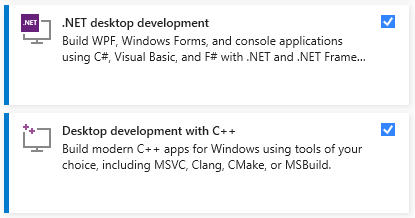
Visual Studio requirements
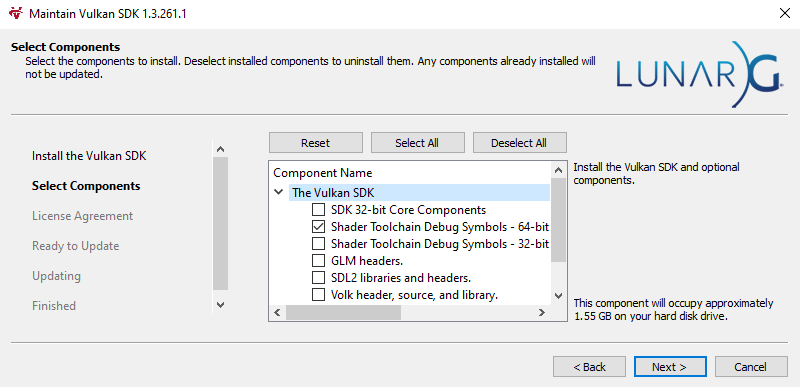
Vulkan SDK + Debug symbols
Note
It is recommended to restart your PC after installing Vulkan SDK. If you didn’t restart PC and face any issues, try restarting it and regenerating VS solution.
The solution has three configurations: Debug; ReleaseWithDebug; Release. In Debug configuration, all optimizations are disabled, and some Eagle Engine debug tools are enabled. For example, you can use PhysX Visual Debugger to debug physics. ReleaseWithDebug configuration is the same as Debug but all optimizations are enabled. Release configuration disables debugging tools and enables all optimizations. Also, the default OS console will be hidden. So, if you want to measure the performance, use Release builds.
Note
Take a look at Eagle/Core/Core.h file. It contains some useful defines that might help you to debug.
For example, there’s a EG_GPU_MARKERS define. When set ot 1, GPU markers will be created so that you can see render-pass names when using debug tools such as RenderRoc.
Enabling EG_GPU_MARKERS might affect performance.
Download Eagle Engine
If you don’t want to build the engine manually, you can download pre-built binaries.
Go to Releases where you will see all engine releases. Each post has files attached to it and
there you’ll see a .zip archieve with the engine. Download it and unpack it. Go to Eagle-Editor folder and run the engine (Eagle-Editor.exe).
For writing scripts you’ll need Visual Studio with .NET SDK support.
Go here to learn more about writing scripts.